
How to Set Up Automatic Updates for Lead Data as Companies Change
Your CRM is lying to you. Not intentionally, but the moment a lead changes jobs, their company gets acquired, or their team reorgs, that record starts aging out. According to Landbase, a striking 70% of CRM data is outdated, incomplete, or inaccurate. For SDRs, RevOps leaders, and AEs who depend on that data to route, sequence, and close, stale records translate directly to wasted effort and missed pipeline.
Setting up automatic updates for lead data as companies grow or change is no longer optional. This guide gives you the architecture, field prioritization, and governance framework to keep your CRM current without manual cleanup sprints.

Rich Data. Real Conversations. More Pipeline.
Tired of sending generic outreach because your contact data is incomplete? Apollo surfaces enriched firmographic and technographic context so every message lands. Start building pipeline with data that actually works.
Start Free with Apollo →Key Takeaways
- B2B contact data decays faster than most teams realize, making automated refresh a revenue-critical investment, not a nice-to-have.
- A tiered freshness model lets you prioritize which fields update in real time versus on a weekly schedule, based on their pipeline impact.
- Governance rules (field ownership, overwrite logic, and audit trails) prevent automatic updates from creating silent downstream damage.
- RevOps leaders who consolidate enrichment, prospecting, and engagement into one platform reduce integration complexity and improve data reliability.
- Job change alerts are among the highest-ROI triggers for automatic lead data updates, surfacing warm pipeline from existing contacts.
Why Does Lead Data Decay So Quickly?
B2B contact data decays because companies, roles, and people change constantly. Professionals change jobs, companies merge, and teams restructure throughout the year. Research from RevenueBase shows that email decay accelerated to 3.6% monthly as of November 2024, meaning nearly three-quarters of prospect databases become outdated within 12 months.
The most common decay triggers include:
- Job changes and promotions (contact-level decay)
- Company rebrands, acquisitions, or spin-offs (account-level decay)
- Office closures or HQ relocations (firmographic decay)
- Phone number and email address turnover (channel-level decay)
Manual cleanup cannot keep pace with this rate of change. Automation is the only scalable answer. Tired of working from a database full of bounced emails and wrong titles? Keep your CRM current with Apollo's continuous data enrichment.
What Is a Tiered Freshness Model for Lead Data?
A tiered freshness model assigns each CRM field a refresh frequency based on how quickly it changes and how much its staleness hurts pipeline. Not every field needs real-time updating.
Matching update frequency to business impact prevents unnecessary API calls and governance conflicts.
| Tier | Refresh Frequency | Example Fields | Why It Matters |
|---|---|---|---|
| Tier 1: Critical | Real-time / event-driven | Job title, email, company name | Drives routing, sequencing, and personalization |
| Tier 2: Important | Daily or weekly | Employee count, funding stage, phone | Affects ICP scoring and territory assignment |
| Tier 3: Contextual | Monthly or on-demand | Industry, HQ address, revenue range | Supports segmentation and reporting |
Event-driven triggers (a contact changes jobs, a company raises a funding round) should fire Tier 1 updates immediately. Scheduled batch enrichment handles Tier 2 and 3 fields on a recurring cadence.
This hybrid approach keeps high-impact data fresh without over-engineering your pipeline.

How Do RevOps Teams Set Up Automatic Lead Data Updates?
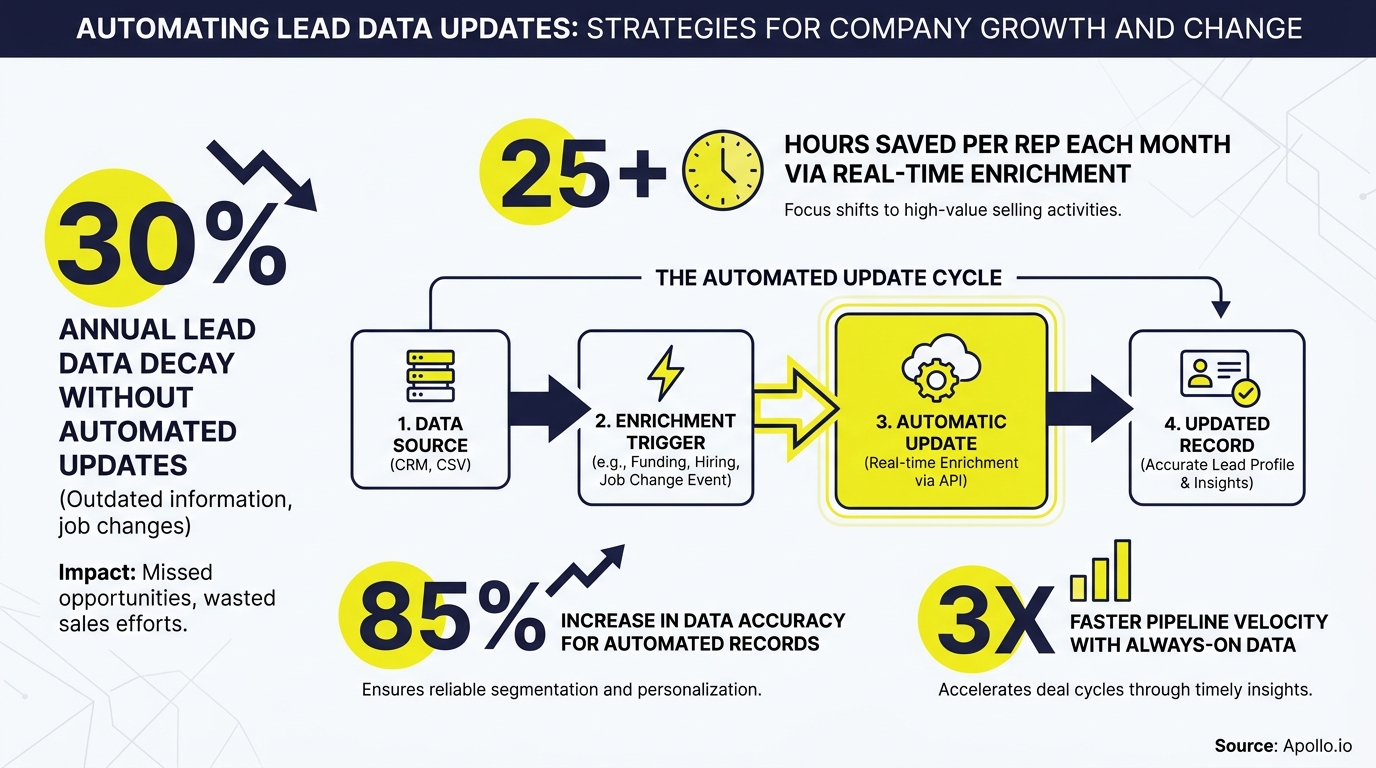
RevOps teams set up automatic lead data updates by combining an enrichment data source, trigger logic, field mapping rules, and a conflict resolution policy inside their CRM workflow engine. The four-step framework below applies whether you are using a native CRM enrichment feature or a third-party enrichment integration.
- Define your source of truth. Choose one authoritative data provider per field. Competing sources create overwrite conflicts that silently corrupt records.
- Map fields and set overwrite rules. Decide whether an incoming enriched value overwrites an existing one, appends to it, or only fills blanks. Blank-fill-only rules are safest for fields reps maintain manually.
- Configure triggers. Set event-based triggers (new record created, contact email bounces, job change detected) for Tier 1 fields. Set scheduled triggers (nightly or weekly cron jobs) for Tier 2 and 3.
- Build an exception queue. Route records that fail enrichment matching to a review queue rather than leaving them silently stale. Assign ownership so someone is accountable for resolution.
For teams using Apollo's job change alerts and data enrichment, this trigger-and-update logic is built in. When a tracked contact changes roles, Apollo flags the record automatically, so SDRs and AEs can follow up while the relationship is still warm.
How Do SDRs and AEs Benefit from Automatic Lead Data Updates?
SDRs benefit most from job change alerts and real-time title updates, which surface warm outreach opportunities the moment a champion moves to a new company. AEs benefit from automatic account-level updates (funding rounds, headcount growth, new office locations) that signal expansion potential or deal urgency.
Specific use cases by role:
- SDRs: Receive an alert when a past champion joins a new target account. Reach out with context before a competitor does.
- AEs: See a funding round update on an open opportunity and adjust deal size or stakeholder map accordingly.
- RevOps leaders: Automatic territory reassignment fires when a lead's company crosses an employee-count threshold, preventing routing errors.
- Marketing: Segment lists refresh automatically as ICP scores update, keeping nurture campaigns targeted.
Learn how job change alerts can turn CRM updates into pipeline wins for your entire GTM team.
Turn Funnel Guesswork Into Real Pipeline
Pipeline forecasting a guessing game because your leads never convert? Apollo surfaces in-market buyers with verified contact data so your funnel fills with opportunities that actually close. Join 600K+ companies building predictable revenue.
Start Free with Apollo →What Governance Rules Prevent Automatic Updates from Breaking Things?
Governance rules prevent automatic updates from creating silent data corruption by defining who owns each field, what can be overwritten, and how conflicts get resolved. Without these guardrails, automated enrichment can overwrite good data with worse data, break lead scoring models, or trigger incorrect routing.
The minimum governance checklist for any automatic update workflow:
- Field ownership map: Document which system is the source of truth for each CRM property.
- Overwrite policy: Never overwrite, blank-fill only, or always overwrite. Set per field, not globally.
- Audit trail: Log every automated change with timestamp, source, and previous value. This is required for debugging and, increasingly, for privacy compliance.
- SLA on exception queues: Unmatched or conflicted records need a defined review window (e.g., resolved within 48 hours).
- Change notification: Alert the record owner when a high-impact field (job title, email) changes automatically, so reps are not caught off guard on a call.
A Validity report cited by PR Newswire found that 76% of organizations reported less than half of their CRM data is accurate and complete. Automation without governance is what keeps that number high.
Which Architecture Pattern Should You Use for Automated Lead Data Sync?
The right architecture depends on your stack complexity, data volume, and how many systems need to stay in sync. Most B2B GTM teams fall into one of three patterns.
| Pattern | Best For | Tradeoffs |
|---|---|---|
| Native CRM Enrichment | Teams using HubSpot or Salesforce as their primary system of record | Lowest integration overhead; limited to what the CRM vendor offers |
| Third-Party Enrichment Integration | Teams that need broader data coverage or specific signals (funding, job changes) | More coverage; adds another integration point to govern |
| Reverse ETL / iPaaS | RevOps teams syncing enriched data across CRM, data warehouse, and MAP simultaneously | Most flexible; highest setup and maintenance cost |
For most growing B2B teams, a third-party enrichment integration connected directly to the CRM covers 80% of use cases with the least overhead. Tools like Apollo's CRM enrichment handle both scheduled bulk refresh and event-driven updates in one platform, consolidating what used to require separate tools for prospecting, enrichment, and engagement. As Cyera noted, "Having everything in one system was a game changer."
How Do You Measure Whether Your Automatic Updates Are Working?
Measure the effectiveness of automatic lead data updates by tracking data completeness rate, match rate, and downstream pipeline metrics before and after implementation. Vanity metrics (records updated per week) are less useful than outcome metrics (routing accuracy, bounce rate reduction, conversion lift).
Core metrics to track:
- Data completeness rate: Percentage of records with all required fields populated. Target above 90% for Tier 1 fields.
- Enrichment match rate: Percentage of records successfully matched and updated by your enrichment source.
- Email bounce rate: A direct indicator of contact-level data freshness. Should decline after automated refresh is live.
- Routing accuracy: Percentage of leads routed to the correct owner or territory on first assignment.
- Pipeline influenced by enriched records: Track opportunities where an automatic update (job change, funding alert) preceded the outreach that opened the deal.
For a deeper look at how contact data enrichment drives ROI, including which metrics matter most at each stage of the funnel, review Apollo's enrichment ROI framework.

Start Keeping Your Lead Data Current in 2026
Automatic updates for lead data are not a set-and-forget project. They require a tiered freshness model, clear governance rules, and ongoing measurement to stay effective as your company grows.
The good news: teams that invest in continuous enrichment stop losing pipeline to stale records and start reaching the right people at the right moment.
Apollo combines sales intelligence, CRM data enrichment, job change alerts, and multi-channel engagement in one platform, replacing the fragmented stack that makes data governance so painful. Whether you are an SDR chasing job change signals or a RevOps leader building a territory routing engine, Apollo gives your team one source of accurate, continuously updated B2B contact data.
Get Leads Now and stop letting data decay drain your pipeline.
Prove Pipeline ROI With Apollo
Budget approval stuck on unclear metrics? Apollo delivers measurable pipeline impact so you can justify every dollar with confidence. Leadium 3x'd their annual revenue — see what Apollo does for your numbers.
Start Free with Apollo →Don't miss these
Sales
Inbound vs Outbound Marketing: Which Strategy Wins?
Sales
What Is a Sales Funnel? The Non-Linear Revenue Framework for 2026
Sales
What Is a Go-to-Market Strategy? The 2026 GTM Playbook
See Apollo in action
We'd love to show how Apollo can help you sell better.
By submitting this form, you will receive information, tips, and promotions from Apollo. To learn more, see our Privacy Statement.
4.7/5 based on 9,690 reviews
