
How to Incorporate Surveys or Qualifying Questions in an Email (2026 B2B Playbook)
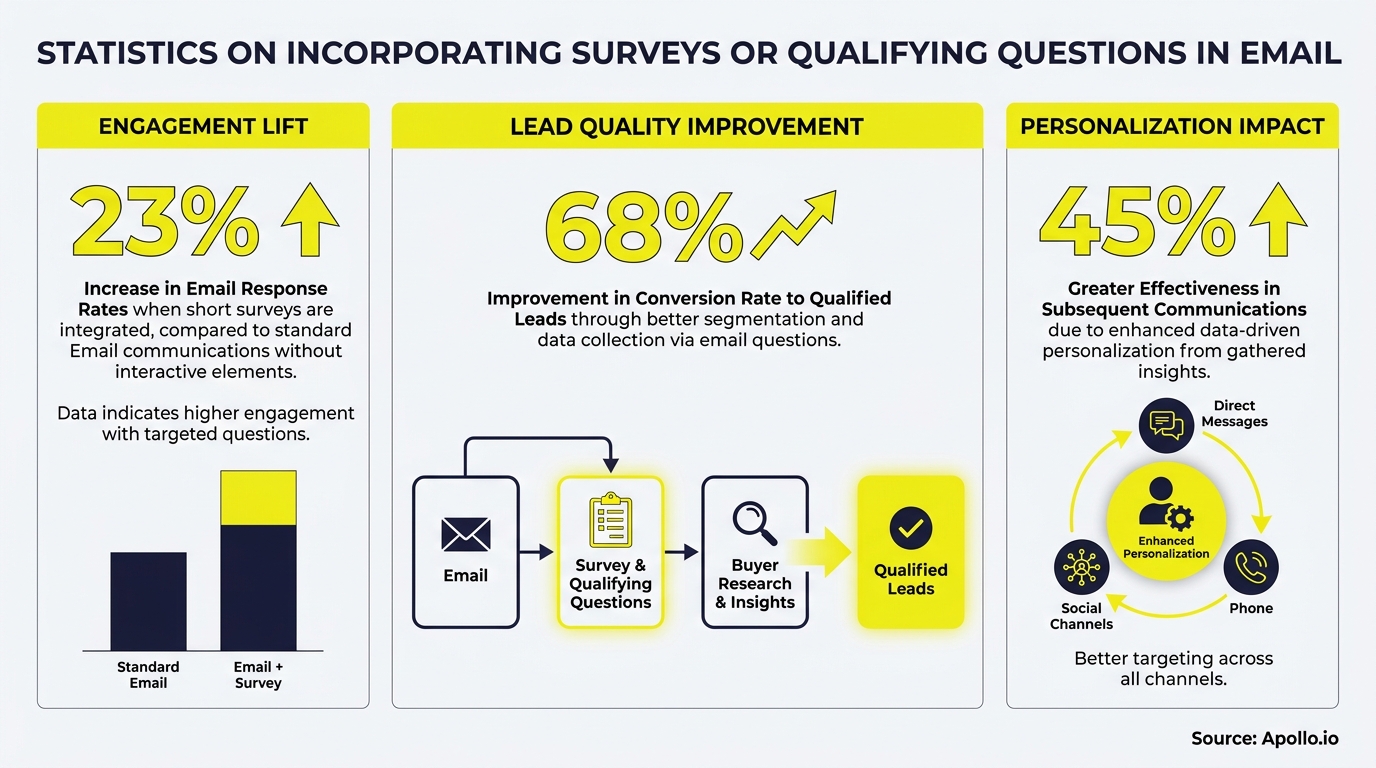
Most B2B nurture emails make one critical mistake: they pitch before they listen. According to Gartner, 73% of B2B buyers actively avoid suppliers that send irrelevant outreach. Embedding surveys or qualifying questions in your emails fixes this by letting buyers tell you exactly what they need before your next touchpoint. If you want emails that actually convert, start by learning how to write sales emails that get responses and then layer in the qualification tactics below.

Research Less, Pipeline More With Apollo
Tired of burning hours verifying contacts before a single email goes out? Apollo surfaces accurate, ready-to-work leads so your team sells instead of searches. Join 600K+ companies building pipeline faster.
Start Free with Apollo →Key Takeaways
- Surveys capture preference data; qualifying questions capture intent and buying stage. Use each for different goals.
- One question per email outperforms multi-question surveys for B2B response rates, especially in cold or early-nurture contexts.
- Responses must feed directly into your CRM as segmentation signals, not sit as disconnected campaign data.
- Privacy microcopy (explaining why you ask and how you use answers) significantly improves completion rates and trust.
- SDRs and demand gen teams that route leads based on declared intent can prioritize outreach far more precisely than those relying on behavioral signals alone.
What Is the Difference Between a Survey and a Qualifying Question in an Email?
A survey collects preference or satisfaction data across multiple responses; a qualifying question captures a single declared signal about buying intent, role, timeline, or pain point. Both belong in your email strategy, but they serve different purposes at different funnel stages.
| Type | Primary Goal | Best Funnel Stage | Example |
|---|---|---|---|
| Survey (multi-question) | Preference + satisfaction data | Post-purchase, mid-nurture | "Rate your top 3 content priorities" |
| Qualifying question (single) | Intent + routing signal | Early outreach, MQL handoff | "What's your biggest challenge right now?" |
| One-click poll | Segmentation by topic | Top-of-funnel, newsletter | "Which topic matters most to you? [A] [B] [C]" |
| Progressive profiling | Build contact record over time | Ongoing nurture | One new question per email send |
Litmus' 2026 trends report notes that while 97% of marketers now use at least one interactive element in email, surveys and polls still appear in only 13% of campaigns, creating a meaningful differentiation opportunity for B2B teams.
What B2B Qualifying Questions Should You Ask at Each Buying Stage?
The right qualifying question depends on where the buyer is in their journey. Early-stage questions reveal fit; later-stage questions reveal urgency and decision authority.
| Buying Stage | Question to Ask | Response Options | Routing Outcome |
|---|---|---|---|
| Awareness | "What's your top priority this quarter?" | Pipeline / Data quality / Cost / Speed | Segment into content track |
| Consideration | "Are you currently evaluating tools in this space?" | Yes, actively / Researching / Not yet | Flag for SDR follow-up if "Yes" |
| Decision | "When are you planning to make a decision?" | Within 30 days / 1–3 months / 3+ months | Route to AE for immediate outreach |
| Role/Fit | "Which best describes your team?" | SDR/BDR / AE / RevOps / Marketing / Founder | Personalize content and messaging |
For SDRs managing high-volume outreach, a single qualifying question embedded in a follow-up email can replace an entire discovery call when the response options are mapped to clear routing rules. As noted in a Reddit discussion on survey design, adding "trap" or red-herring answer options helps filter out unqualified respondents who are gaming incentivized surveys, a tactic equally useful in B2B screener emails.
How Do You Implement Qualifying Questions in an Email Without Killing Deliverability?
Embed qualifying questions as linked buttons or plain-text answer options, not as embedded HTML forms. Most email clients strip complex form code, and heavy HTML can trigger spam filters.
Research from KL Communications highlights that major email providers have seen significant drops in inbox delivery rates, with Office365 down 26.7%, Outlook down 22.6%, and Google Workspace down 10.5%. This makes clean, lightweight email design non-negotiable. For a deeper look at protecting inbox placement, see Apollo's guide on email deliverability and spam filters.
Implementation checklist:
- Use 1–3 linked answer options as plain buttons (e.g., "[A] Pipeline" / "[B] Data quality" / "[C] Cost")
- Each option links to a unique URL so your MAP or CRM captures the click as a field value
- Keep the email body under 200 words when a question is the primary CTA
- Add preference language: "You can update your preferences or opt out at any time"
- Test rendering across Outlook, Gmail, and Apple Mail before sending at scale
Struggling to qualify leads before they reach your pipeline? Build a smarter qualification pipeline with Apollo and route only sales-ready prospects to your AEs.
Turn Weak Leads Into Pipeline With Apollo
Pipeline forecasting a guessing game because MQLs never convert? Apollo surfaces in-market buyers with verified contact data so your team reaches the right prospects at right moment. Join 600K+ companies building predictable pipeline.
Start Free with Apollo →How Do SDRs and Demand Gen Teams Turn Email Responses into CRM Segments?
Email responses only create value when they flow into your CRM as actionable field data, not as inbox replies or disconnected survey exports. The workflow below applies to most marketing automation platforms and CRM setups.
- Map each answer option to a unique tracked URL. Your MAP records the click and writes the value to a contact field (e.g., "Buying Stage = Decision").
- Trigger a segmentation rule. Contacts with "Buying Stage = Decision" enter a high-priority nurture or get flagged for SDR outreach within 24 hours.
- Score the response. Add points to lead score based on urgency signals. A "within 30 days" response scores higher than "3+ months."
- Sync to CRM. Push the field value to Salesforce or HubSpot so AEs see declared intent before their first call.
- Report on routing outcomes. Track which qualifying questions produce the highest MQL-to-opportunity conversion to refine your question bank over time.
According to Red Branch Media, implementing survey mechanisms and monitoring engagement metrics to adjust campaigns based on responses is a recommended best practice for B2B email marketing. For SDRs and RevOps leaders, this means qualifying question data should appear in dashboards alongside open and reply rates, not just as a one-off campaign report.
A Reddit user shared a firsthand perspectiveon catching respondents gaming surveys: adding plausibly fake answer options to a "select all that apply" list (similar to how a banking team added fictitious neobank names to a real list) is an effective way to validate the quality of declared responses before they enter your CRM.

What Privacy Microcopy Should You Include with Email Qualifying Questions?
Privacy microcopy is the brief explanation beneath your question that tells recipients why you're asking and how their answer will be used. It reduces friction and builds the trust that drives completion.
Do/Don't table for email survey privacy language:
| Do | Don't |
|---|---|
| "We use your answer to send you relevant content only." | "We may share your data with our partners." |
| "This takes one click. You can update preferences anytime." | No context, no opt-out mention |
| "Your answer won't trigger a sales call unless you ask for one." | Vague language like "help us improve your experience" |
| Link to your privacy policy in the footer | Burying data use language in terms of service |
Note that survey response rates vary by channel and industry, as Clootrack confirms. In-app surveys, for example, significantly outperform email surveys in raw response rates according to Retently. This is why email qualifying questions work best when kept to a single ask with immediate, visible value for the respondent.
For broader guidance on email personalization strategies that improve reply rates, including how to frame content offers around buyer pain points, review Apollo's prospecting email playbook.
How Do You Use Progressive Profiling to Qualify Leads Across Multiple Emails?
Progressive profiling asks one new question per email send rather than overwhelming recipients with a multi-question survey upfront. Over three to five touchpoints, you build a complete lead profile without friction.
Sample progressive profiling sequence for B2B:
- Email 1: "What's your biggest challenge right now?" (Pain point)
- Email 2: "How large is your sales team?" (Company fit)
- Email 3: "Are you currently evaluating solutions?" (Intent)
- Email 4: "When do you need to have a solution in place?" (Timeline)
- Email 5: "Who else is involved in this decision?" (Buying committee)
AEs and RevOps leaders benefit most from this approach because each response enriches the contact record before a discovery call occurs. Combine progressive profiling with a structured sales messaging framework so follow-up emails align precisely with the declared pain point from the prior send.
Spending hours manually personalizing follow-ups based on survey responses? Automate your multi-step sequences with Apollo's sales engagement platform and trigger the right follow-up based on each qualifying response automatically.

Start Qualifying Earlier and Personalizing Better
Embedding surveys or qualifying questions in email transforms a one-way broadcast into a two-way data channel. The goal is not more questions; it is one better question at the right moment, mapped to a routing rule that makes your next touchpoint feel inevitable rather than generic.
B2B GTM teams that build this system, from a clear question bank to CRM field mapping to segmented follow-up sequences, generate higher-quality pipeline with less manual work. Apollo's all-in-one platform helps you consolidate prospecting, sequencing, and deal tracking in one workspace, so qualifying data captured in email flows directly into your pipeline without switching tools.
Ready to build smarter outreach sequences that qualify as they engage? Request a Demo and see how Apollo's GTM platform connects contact data, email sequences, and pipeline management in one place.
Prove Pipeline ROI With Apollo
ROI pressure killing your next budget approval? Apollo delivers measurable pipeline impact from day one — no lengthy ramp, no guesswork. Leadium 3x'd annual revenue after making the switch.
Start Free with Apollo →Don't miss these
Sales
Inbound vs Outbound Marketing: Which Strategy Wins?
Sales
What Is a Sales Funnel? The Non-Linear Revenue Framework for 2026
Sales
What Is a Go-to-Market Strategy? The 2026 GTM Playbook
See Apollo in action
We'd love to show how Apollo can help you sell better.
By submitting this form, you will receive information, tips, and promotions from Apollo. To learn more, see our Privacy Statement.
4.7/5 based on 9,690 reviews
