
How to Import Partial Data Sets Without Losing Existing Enriched Data in 2026
Every time your team runs a partial import, you risk wiping out months of carefully enriched contact data. A new column of phone numbers shouldn't blank out firmographic fields your RevOps team spent weeks building. Yet careless merge logic does exactly that. According to IBM, over a quarter of organizations estimate they lose more than $5 million annually due to poor data quality. Protecting your enriched contact data during incremental loads is no longer optional.

Research Less, Pipeline More With Apollo
Tired of watching selling time vanish into manual research and dead-end contact data? Apollo delivers verified contacts so your team closes deals instead of chasing info. Nearly 100K paying customers scaled pipeline without the grunt work.
Start Free with Apollo →Key Takeaways
- Use upsert logic with field-level survivorship rules to merge new records without overwriting enriched attributes.
- Null/blank handling is the most common overwrite failure mode — define explicit "skip if empty" policies before any import.
- Stage new records in an isolated holding area, enrich them, then merge into your primary dataset to protect existing records.
- RevOps leaders who formalize governance rules (source-of-truth designations, stewardship workflows) prevent merge conflicts at scale.
- Platforms now expose "non-destructive update" controls natively — use them instead of relying on tribal knowledge.
Why Do Partial Imports Destroy Enriched Data?
Partial imports destroy enriched data when import logic treats every incoming field as authoritative, overwriting populated destination fields with blank or lower-quality source values. The most common failure mode is null propagation: your incoming CSV has no value for a field, but the import job writes that empty value over a previously enriched attribute.
A Reddit user shared a firsthand perspectiveon why re-running enrichment on every import doesn't scale: repeated merge/expand operations force the system to scan entire tables for matches each time, putting all data into RAM and causing processing to skyrocket. Enrichment should happen upstream once, then be preserved during subsequent partial loads.
Research from Demand Gen Report shows poor data disrupts lead handoffs and slows sales productivity for more than 60% of teams. For SDRs and AEs who rely on enriched firmographics to personalize outreach, a botched import can kill pipeline quality overnight.
What Are Field-Level Survivorship Rules?
Field-level survivorship rules are governance policies that determine which source wins when two systems have conflicting values for the same field. Rather than applying one blanket "overwrite" or "preserve" policy to an entire record, survivorship rules operate field by field.
| Field Type | Recommended Survivorship Rule | Rationale |
|---|---|---|
| Enriched firmographics (industry, headcount) | Preserve existing unless incoming is newer timestamp | Enrichment sources are often higher quality than raw imports |
| Contact status / lifecycle stage | Preserve existing; never overwrite with blank | Workflow triggers depend on accurate stage data |
| Phone / email (raw import) | Update if incoming is non-null and passes validation | New import may contain fresher contact info |
| Lead score / intent signals | Always preserve; managed by scoring system only | Manual imports should never overwrite scored attributes |
| Custom enriched fields (e.g., ICP tier) | Preserve; flag for human review if conflict detected | Curated fields have high business value |
Assign a data steward to own survivorship decisions for each field category. Without formal stewardship, RevOps teams default to "last write wins," which systematically destroys enriched values over time. For a deeper foundation, see how to build a data enrichment strategy that formalizes these rules before imports run.

How Do You Stage and Merge Records Safely?
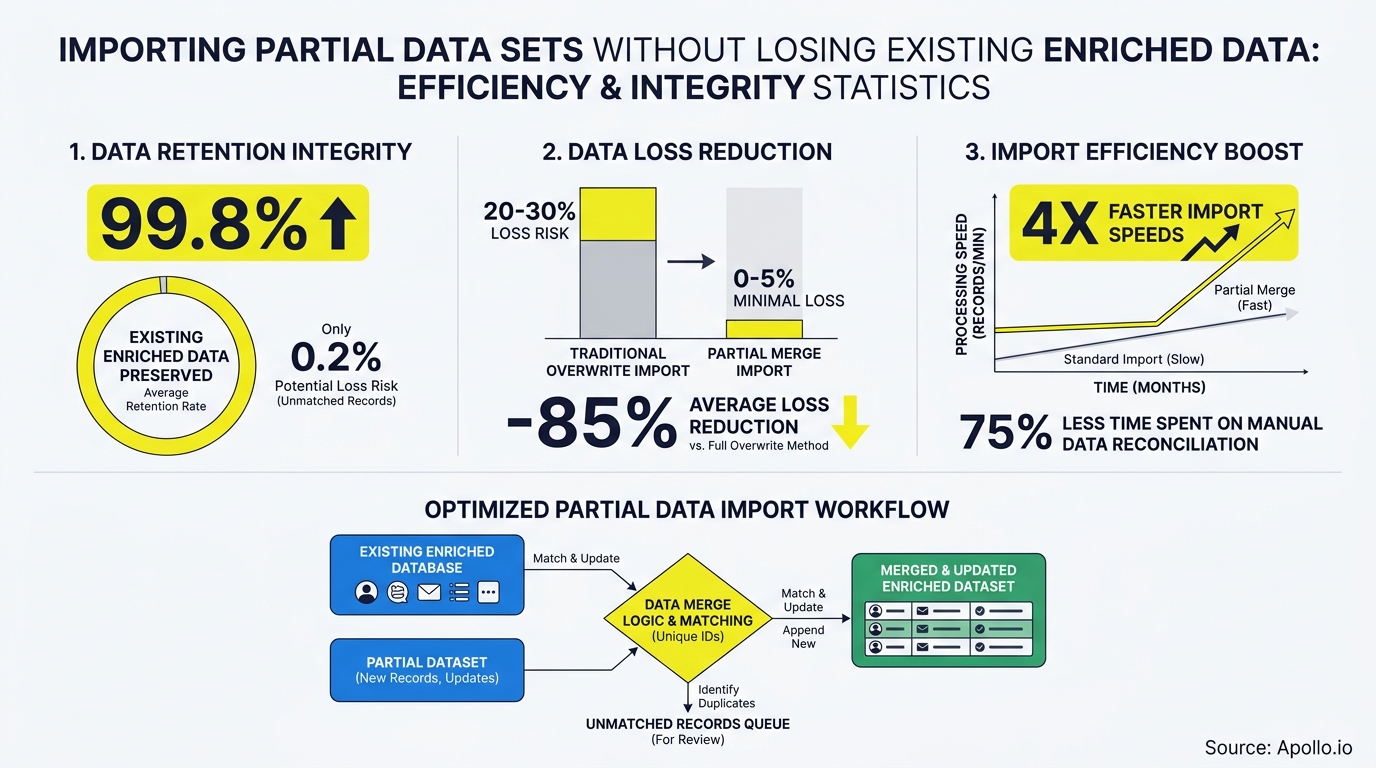
Safe partial imports use a staging area: new records are loaded into an isolated holding environment, validated, and enriched before being merged into the production dataset. This pattern prevents untested data from touching enriched records directly.
A Reddit user shared a firsthand perspectiveon exactly this workflow: new items go into a "Temp Holding" source, get fully curated there, and are only moved to the main library after enrichment is complete. The same principle applies to CRM and B2B data pipelines.
Five-step staging workflow:
- Export a backup of all affected records before any import begins.
- Load incoming records into a staging table — never directly into production.
- Run validation gates: check for null fields, duplicate keys, and format violations.
- Apply survivorship rules: for each field, compare staging value against production value using your field-level policies.
- Execute upsert: insert new records, update only fields where the incoming value passes survivorship logic.
Tired of manual import workflows destroying your enriched records? Apollo's CRM enrichment tool applies non-destructive updates automatically, preserving your curated fields while refreshing stale contact data.
How Should RevOps Teams Handle Null and Blank Values?
RevOps teams should configure every import job to skip null or blank incoming values by default, only overwriting a destination field when the incoming value is explicitly populated and passes quality checks. Null propagation is the leading cause of enriched data loss during partial imports.
Platforms increasingly expose native controls for this: "don't overwrite if blank," "only update populated fields," and upsert modes with null-handling flags. These are no longer advanced features requiring custom ETL code.
Modern reverse ETL tools and CRM import APIs surface these controls directly in their UI.
Null-handling checklist before every partial import:
- Confirm the import tool has a "skip blank values" or equivalent option enabled.
- Audit the incoming file for columns with high null rates before running the job.
- Set enriched-field columns as "preserve existing" in your field mapping.
- Run a test import on 10-20 records and diff the before/after state.
- Log all field-level changes in an audit trail for rollback capability.
According to MarketingOps, 75% of RevOps professionals cite data inconsistencies as the most frustrating part of their tech stack. Null mismanagement during partial imports is one of the primary drivers of those inconsistencies. Learn more about resolving these conflicts in our guide to solving data synchronization headaches across multiple business systems.
Turn Funnel Guesswork Into Predictable Pipeline
Pipeline forecasting a guessing game because leads stall before they ever become opportunities? Apollo surfaces in-market buyers with verified contact data so your team acts on real signals, not hunches. Nearly 100K paying customers stopped guessing and started closing.
Schedule a Demo →What Governance Artifacts Make Partial Imports Audit-Ready?
Audit-ready partial imports require three governance artifacts: a field-level survivorship matrix, a merge-rule contract, and an import audit log. Together these create accountability and a clear rollback path if data is corrupted.
| Artifact | What It Documents | Owner |
|---|---|---|
| Survivorship Matrix | Per-field source-of-truth and conflict resolution rule | RevOps / Data Steward |
| Merge-Rule Contract | Approved import modes (upsert, insert-only, update-only) per object type | Data Engineering / RevOps |
| Import Audit Log | Timestamp, user, records affected, fields changed, before/after values | Automated by import tool |
| Rollback Procedure | Steps to restore pre-import snapshot; tested quarterly | Data Engineering |
These artifacts matter beyond operational hygiene. As organizations adopt AI-ready data architectures, governance quality directly affects model performance. For context on why clean, enriched data drives better business outcomes, see how customer data enrichment works and the downstream revenue impact it enables.
How Do SDRs and RevOps Teams Stay Unblocked During Imports?
SDRs and RevOps teams stay unblocked during partial imports by separating import execution from production access: run imports during off-peak hours, use staging environments, and never grant import jobs write access to fields managed by enrichment or scoring systems.
For SDRs, a corrupted import means outreach sequences fire with wrong job titles, stale phone numbers, or missing ICP-tier fields. That translates directly into missed quota.
RevOps leaders building scalable pipelines should treat field-level write permissions as a governance control, not just a technical setting.
Role-based import permissions framework:
- SDRs / Sales users: Read-only access to enriched fields; can trigger import requests but not execute them.
- RevOps: Can execute imports for approved object types using pre-approved field mappings only.
- Data Engineering: Full import access; responsible for staging infrastructure and rollback procedures.
- Admin: Approves survivorship matrix changes; reviews audit logs monthly.
Worried about data quality degrading between imports? Apollo's data enrichment platform keeps your CRM continuously refreshed with 97% email accuracy, so your team always has clean, current contact data without manual import risk. For a full comparison of available tools, see which data enrichment tools drive revenue in 2026.

How Do You Protect Enriched B2B Data for the Long Term?
Long-term protection of enriched B2B data requires combining non-destructive import policies with continuous enrichment that replaces the need for high-frequency manual imports. Data from Datamatic BPM shows B2B data decays at a rate of 30% to 70% per year depending on the industry. Relying on periodic CSV imports to maintain data quality creates both freshness risk and overwrite risk simultaneously.
The more sustainable model: use an always-on enrichment layer that updates records incrementally as data changes, with survivorship rules baked into the sync logic. This shifts teams from reactive "import and hope" workflows to proactive data governance.
Long-term data protection checklist:
- Replace periodic full-file imports with incremental, change-only syncs where possible.
- Review and update your survivorship matrix quarterly as new data sources are added.
- Monitor field-level null rates on a dashboard to detect import quality degradation early.
- Link your data enrichment and cleansing workflow to a scheduled audit cadence.
- Test rollback procedures on a quarterly basis, not only after incidents.
Ready to stop losing enriched data to careless imports? Get Leads Now and see how Apollo's unified GTM platform keeps your contact data accurate and protected without the import risk.
Prove Pipeline ROI With Apollo
ROI pressure killing your next budget approval? Apollo delivers measurable pipeline impact fast — so you walk into every review with numbers that stick. Leadium 3x'd annual revenue. Your turn.
Start Free with Apollo →Don't miss these
Sales
Inbound vs Outbound Marketing: Which Strategy Wins?
Sales
What Is a Sales Funnel? The Non-Linear Revenue Framework for 2026
Sales
What Is a Go-to-Market Strategy? The 2026 GTM Playbook
See Apollo in action
We'd love to show how Apollo can help you sell better.
By submitting this form, you will receive information, tips, and promotions from Apollo. To learn more, see our Privacy Statement.
4.7/5 based on 9,690 reviews
