
How to Customize Your CRM Integration Across Multiple Pipelines and Products
Most multi-product B2B teams don't have an integration problem. They have a product taxonomy problem.
When pipelines break, deals get lost in the wrong stage, or forecasts look wrong, the root cause is almost always inconsistent field definitions, missing product context, or pipelines that were never designed to reflect how your business actually sells.
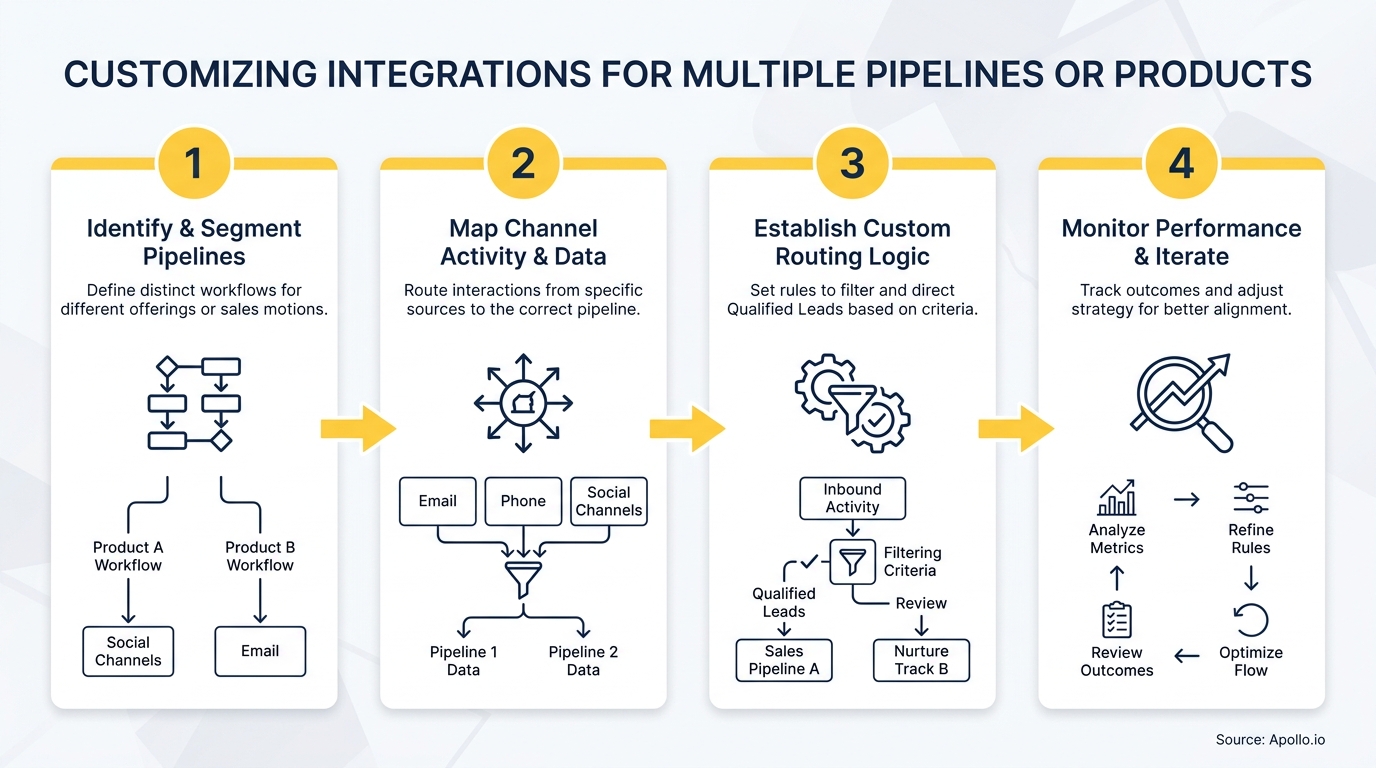
A solid CRM integration strategystarts before you touch any connector. It starts with a decision: should you run separate pipelines per product, or one shared pipeline with product-level segmentation? Getting this wrong creates reporting fragmentation that compounds over time.

Scale Pipeline Without the Manual Grind
Tired of watching your team burn hours on research instead of closing deals? Apollo surfaces verified contacts and automates outreach so your reps spend time selling. Join 600K+ companies building predictable pipeline.
Start Free with Apollo →Key Takeaways
- Use separate pipelines only when your sales process stages are genuinely different across products or motions — not just because you sell different things.
- According to Bain, 70% of companies fail to effectively integrate their sales plays into CRM, limiting expected growth — a problem that starts with poor pipeline architecture, not bad tools.
- Clean product taxonomy and standardized field mapping are prerequisites for AI-powered sales workflows in 2026.
- RevOps leaders who unify pipeline data with product context unlock reliable forecasting and attribution across teams.
- Apollo consolidates prospecting, engagement, and pipeline management into one workspace — reducing the integration debt that fragments multi-product GTM teams.
Should You Use One Pipeline or Multiple Pipelines?
Use separate pipelines when your products have genuinely different sales stages, qualification criteria, or handoff requirements. If two products share the same stages but differ only by audience or price point, a single pipeline with product-specific fields and permissions is the cleaner approach.
| Scenario | Recommended Approach | Why |
|---|---|---|
| Same stages, different products | One pipeline + product field | Unified reporting, simpler governance |
| Different sales cycles (e.g., SMB vs. enterprise) | Separate pipelines | Stage logic and close rates differ materially |
| Different GTM motions (PLG vs. sales-led) | Separate pipelines | Qualification and handoff criteria are incompatible |
| Multiple brands, same process | One pipeline + team permissions | Avoids reporting fragmentation |
| Renewal vs. new business | Separate pipelines | Win rates, stages, and owners are structurally different |
Over-customizing every product line into its own pipeline creates the fragmentation that makes cross-product forecasting unreliable. Under-customizing hides real differences in deal velocity and qualification. The decision rule is simple: if the stage logic differs, use separate pipelines. If only the data differs, use one pipeline with richer fields.
How Do RevOps Leaders Build the Data Model Before Mapping Fields?
RevOps leaders should define their product taxonomy and lifecycle stage definitions before touching any integration settings. Field mapping without a shared data model is the primary cause of sync errors and broken attribution.
Research from RevOps Co-op's 2025 State of RevOps Survey found that 71% of people who rated their data as "good enough" admit that data quality has still negatively impacted their go-to-market team's ability to execute. Clean data is not a nice-to-have — it is the prerequisite for everything downstream.
Build your data model in this order:
- Product taxonomy: Standardize product names, SKUs, and categories across every system (CRM, marketing automation, billing, support).
- Lifecycle stage definitions: Define what MQL, SQL, and each pipeline stage mean for each product motion — in writing, with explicit entry and exit criteria.
- Field mapping: Map product fields to opportunity records so every deal carries product context into your CRM.
- Routing rules: Define which product signals trigger which pipeline, owner assignment, and notification.
- Permissions: Restrict pipeline access by team so reps only see and modify records relevant to their product motion.
This groundwork also matters for AI. With Salesforce Spring '26 introducing agentic data orchestration across 200+ external sources, and HubSpot's AI connectors now creating and updating CRM records automatically, integrations need to expose product context and pipeline logic — not just sync contact fields.
AI agents without clean product taxonomy will route deals incorrectly and generate unreliable next-best-action recommendations.
Struggling to track deals across multiple product lines? Get complete pipeline visibility with Apollo's deal management tools.
How Do You Map Products to Opportunities in Your CRM?
Product-to-opportunity mapping means attaching structured product data to every deal record so your CRM can filter, segment, and report by product without manual tagging.
The core fields to add to each opportunity record:
- Product line(picklist): standardized product or service category
- Product SKU or ID: ties CRM to billing/ERP systems
- Sales motion(picklist): new business, expansion, renewal, reactivation
- Segment: SMB, mid-market, enterprise — defined by employee count or revenue thresholds your team agrees on
- Primary use case: the problem the product solves for this specific buyer
Platform-specific notes:
- HubSpot: Use the native Products object and associate line items to deals. Add custom deal properties for sales motion and segment. Use pipeline permissions to restrict visibility by team.
- Salesforce: Use Opportunity Products (OpportunityLineItem) for SKU mapping. Create custom fields for motion and segment on the Opportunity object. Use record types to enforce stage logic per product line.
- Zoho / Freshworks: Use custom modules or product catalogs linked to deals. Define pipeline-specific layouts to control which fields appear by product.
This structure also solves the data synchronization headaches that appear when contacts and accounts exist in multiple systems without a shared product identifier.

How Should You Configure Routing and Permissions for Multiple Products?
Routing rules should assign inbound leads and newly created opportunities to the correct pipeline and owner based on product interest signals — automatically, without rep intervention.
The routing logic framework:
- Trigger: Form fill, product page visit, demo request, or inbound signal tagged with product interest
- Condition: Product field = [specific product line]
- Action: Assign to pipeline X, owner Y, and notify via Slack or email
- Fallback: Route untagged or ambiguous leads to a triage owner or round-robin pool
For permissions, apply team-based access controls so SDRs and AEs only see records in their product pipeline. This prevents cross-contamination of stage data and keeps forecast categories clean. According to Partnerfleet, 84% of businesses say integrations are "very important" or a "key requirement" for their customers — which means your routing and permissions architecture directly affects the buyer experience, not just internal operations.
Turn Funnel Gaps Into Pipeline Wins
Pipeline forecasting a guessing game because leads stall before they ever become opportunities? Apollo surfaces in-market buyers with verified contact data so your team hits pipeline targets — not just activity metrics. Nearly 100K paying customers trust Apollo to deliver.
Schedule a Demo →How Do SDRs and AEs Work More Effectively Across Multiple Product Pipelines?
SDRs and AEs working across multiple products need a single workspace that surfaces the right product context for each prospect — without switching between tools or pipelines manually.
For SDRs, the challenge is knowing which product to lead with based on firmographic and behavioral signals. For AEs, the challenge is maintaining deal context across a complex, multi-product buying committee. Both roles benefit from sales automation that routes the right message to the right pipeline stage without manual triage.
Apollo consolidates prospecting, sequencing, and pipeline management into one platform — so SDRs can prospect by product segment using 65+ filters, and AEs can track deal progress without toggling between disconnected tools. As Cyera's team put it: "Having everything in one system was a game changer."
Need to run product-specific outreach sequences without building a new tech stack? Automate your multi-product sequences with Apollo's sales engagement platform.
How Do You Build Reliable Reporting Across Multiple Pipelines or Products?
Reliable cross-product reporting requires consistent stage definitions, shared product fields on every deal record, and forecast categories that map to your actual GTM motions.
The minimum reporting template for multi-product teams:
- Pipeline by product line: Deal count, value, and velocity per product
- Stage conversion by motion: Where deals stall for new business vs. expansion vs. renewal
- Source attribution by product: Which channels generate qualified pipeline per product
- Forecast categories: Commit, best case, pipeline — defined consistently across all product pipelines
- Cross-sell / upsell overlay: Accounts with Product A that are in pipeline for Product B
A Deloitte report cited by partner2b in 2025 found that companies integrating RevOps into their GTM systems are 1.4 times more likely to exceed revenue targets by 10% or more. That edge comes directly from the kind of structured, product-aware pipeline data described above — not from adding more tools.
For teams building their sales tech stack, the goal is fewer, better-integrated systems. Technology consolidation reduces the data inconsistencies that make cross-product reporting unreliable in the first place.

How Do You Get Started Customizing Your Integration for Multiple Pipelines or Products?
Start with your data model, not your connector settings. The integration itself takes hours to configure.
The taxonomy and field definitions take days to align — but they determine whether the integration produces reliable data or just moves bad data faster.
Your starting checklist:
- Document your product taxonomy (names, IDs, categories) and get cross-functional sign-off.
- Define pipeline stage criteria for each product motion in writing.
- Add product fields to every opportunity record in your CRM before syncing any data.
- Configure routing rules that trigger on product signals, not just lead source.
- Set team-based permissions so each pipeline is owned and maintained by the right group.
- Build three core reports: pipeline by product, stage conversion by motion, and source attribution by product.
- Review field mapping quarterly as products and GTM motions evolve.
Apollo's all-in-one GTM platform is built for exactly this kind of structured, multi-product selling. Trusted by nearly 100K paying customers — including Anthropic, Smartling, and Autodesk — Apollo gives GTM teams a unified workspace for prospecting, sequencing, and pipeline management without the integration debt of stitching together five separate tools.
As the team at Predictable Revenue put it: "We reduced the complexity of three tools into one."
Ready to build a cleaner, product-aware pipeline without adding more tools to your stack? Start your free trial of Apollo and see how one unified platform handles prospecting, engagement, and pipeline management across every product line you sell.
Prove Pipeline ROI With Apollo
ROI pressure killing your next budget approval? Apollo delivers measurable pipeline impact from day one — so you walk into every review with numbers, not excuses. Nearly 100K paying customers already prove the math.
Start Free with Apollo →Don't miss these
Sales
Inbound vs Outbound Marketing: Which Strategy Wins?
Sales
What Is a Sales Funnel? The Non-Linear Revenue Framework for 2026
Sales
What Is a Go-to-Market Strategy? The 2026 GTM Playbook
See Apollo in action
We'd love to show how Apollo can help you sell better.
By submitting this form, you will receive information, tips, and promotions from Apollo. To learn more, see our Privacy Statement.
4.7/5 based on 9,690 reviews
