
How Do I Integrate a Sales Platform with My CRM System? A 2026 Playbook
Integrating a sales platform with your CRM is no longer an IT project. It is a revenue decision.
Bain found that 70% of companies struggle to integrate sales plays into CRM and revenue technologies, and only about 20% have realized full value from those plays. Meanwhile, AI agents, buyer-facing workflows, and omnichannel engagement all depend on one thing: clean, connected CRM data.
If your systems are siloed, your pipeline suffers and your AI investments underperform.
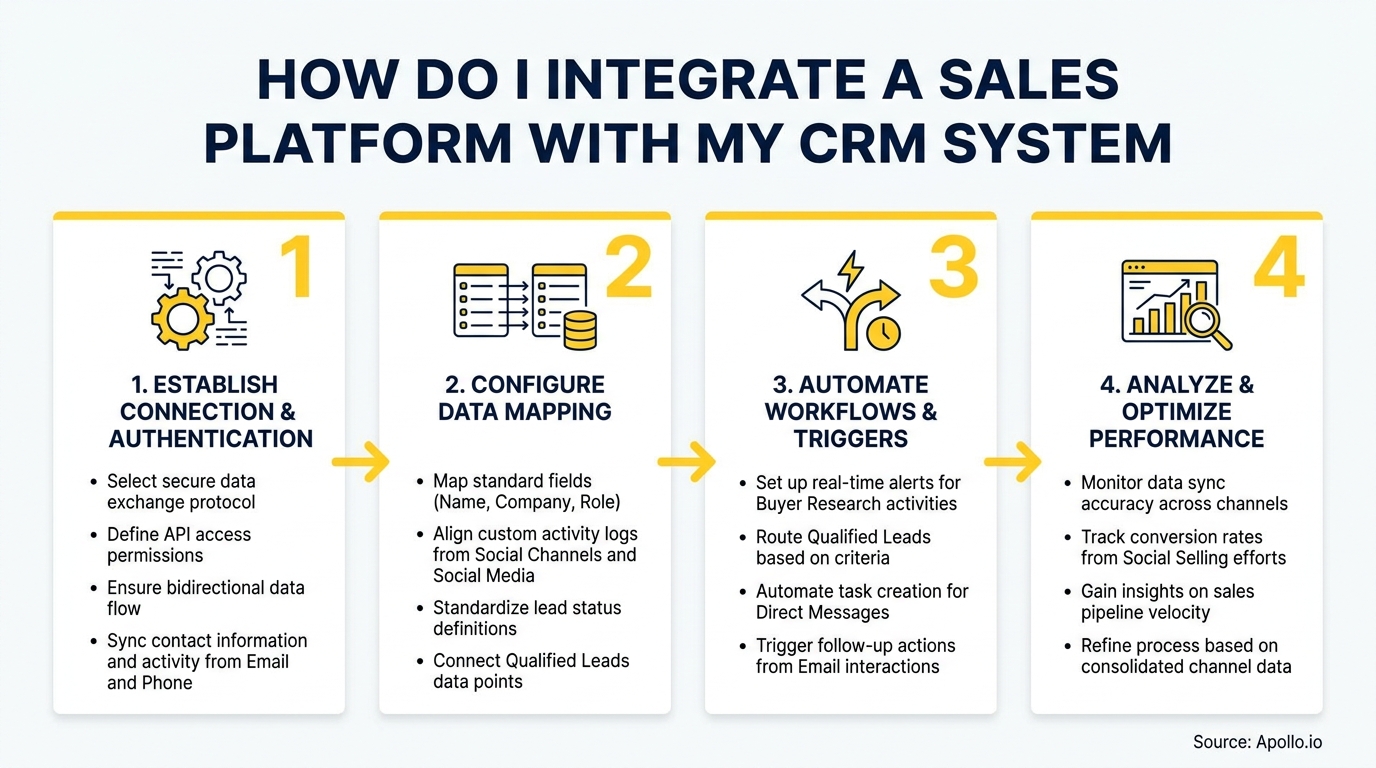
This playbook walks through a governance-first approach to CRM integration strategy: from data readiness and sync design to ROI measurement and buyer-journey use cases. Whether you are a RevOps leader standardizing your stack or an SDR tired of manual data entry, this guide gives you the steps to get integration right.

Scale Smarter With Apollo's AI Engine
Tired of slow lead gen and inconsistent team playbooks? Apollo standardizes your outreach with AI-powered prospecting across 230M+ verified contacts. Start building pipeline that scales with your team.
Start Free with Apollo →Key Takeaways
- CRM integration is now an AI-readiness requirement: clean data, permissions, and field mapping determine how well AI agents perform, not just how well reports look.
- Start with a data audit before touching any connector. Field mapping and deduplication rules prevent downstream chaos.
- Bidirectional sync with conflict resolution rules outperforms one-way sync for most GTM teams.
- 82% of revenue leaders agree that unified sales and marketing tooling significantly improves outcomes, making alignment a measurable ROI driver.
- Platforms that consolidate prospecting, engagement, and CRM sync into one workspace reduce manual reconciliation and cut tech stack costs.
Why Does CRM Integration Matter for Revenue Teams in 2026?
CRM integration matters because disconnected systems directly cost revenue. Research from New Breed Revenue shows that 82% of revenue leaders agree a unified tool for sales and marketing significantly improves revenue outcomes. Yet most teams are still patching together separate tools for prospecting, outreach, and pipeline tracking, creating data gaps at every handoff.
The stakes have risen because AI agents now sit on top of CRM data. Gartner's 2025 Hype Cycle for Sales Transformation named AI agents for sales among the most critical technologies, but noted that agents need clean CRM access, metadata, and permissions to function reliably. Bad integration means bad AI output. Additionally, Kixie reports that 49% of businesses see improved data quality specifically from CRM integration, confirming that the act of connecting systems itself drives accuracy.
How Do I Audit My CRM Data Before Integration?
Run a data readiness audit before connecting any sales platform to your CRM. This prevents dirty data from replicating across both systems at scale.
Your pre-integration checklist:
- Object inventory: List every object you plan to sync (Contacts, Leads, Accounts, Opportunities, Activities, Custom Objects).
- Field mapping: Map source fields in your sales platform to destination fields in your CRM. Flag mismatches and missing fields.
- Deduplication rules: Define your match logic (email, domain, phone) and assign a primary system of record per object type.
- Governance owner: Assign one RevOps owner who approves field additions and monitors sync errors.
- Access and permissions: Apply least-privilege access. Only users and integrations that need a field should see or write to it.
For teams using Apollo, the Apollo CRM integration setup walks through field mapping for Salesforce and HubSpot, including which objects sync by default and how to customize rules without developer support.

What Is the Difference Between Bidirectional Sync and One-Way Sync?
Bidirectional sync means records update in both the sales platform and the CRM when changes occur in either system. One-way sync pushes data from only one source to the other.
| Sync Type | Best For | Risk |
|---|---|---|
| One-Way (Sales Platform → CRM) | Initial data loads, lead creation | CRM updates don't flow back; reps see stale data |
| One-Way (CRM → Sales Platform) | Enrichment pushes, account data refreshes | Sales platform data can drift from CRM source of truth |
| Bidirectional | Active GTM teams with reps working in both systems | Requires conflict resolution rules to prevent overwrites |
Most B2B GTM teams need bidirectional sync. Reps update deal stages in the CRM; SDRs update contact info in the sales platform.
Without two-way sync, one system always lags. Set a conflict resolution rule (for example, "most recent write wins" or "CRM is master for Opportunity stage") and document it before go-live.
Sync frequency guidance: Activity data (emails, calls, meetings) should sync in near real-time or every 15 minutes. Contact and account records can sync hourly. Opportunity stage changes should sync immediately to avoid pipeline reporting gaps.
Turn Funnel Guesswork Into Pipeline Wins
Tired of watching marketing leads stall before they ever reach your pipeline? Apollo surfaces high-intent buyers and delivers verified contacts so your team acts on real signals. 600K+ companies stopped guessing and started closing.
Start Free with Apollo →How Do RevOps Leaders Measure ROI from CRM Integration?
RevOps leaders measure CRM integration ROI by baselining key metrics before go-live, then tracking changes at 30, 60, and 90 days post-integration.
KPIs to baseline and track:
- Data entry time per rep per week (manual hours eliminated)
- Duplicate record rate (target: below 2%)
- Pipeline coverage accuracy (forecast vs. actual close)
- Sequence-to-opportunity conversion rate
- CRM field completeness rate (contacts with email, phone, title, company)
- Time from lead creation to first touch
According to Freshworks, 94% of businesses have seen a surge in sales productivity since adopting a CRM platform, with 44% experiencing a productivity increase of 10-29%. Tying integration to specific rep-time and pipeline metrics gives you the evidence to justify the investment and identify where to optimize next.
Struggling to keep pipeline data clean and current? Apollo's deal management tools give RevOps teams real-time pipeline visibility without the manual reconciliation.
How Do SDRs and AEs Benefit from a Connected Sales Platform and CRM?
SDRs benefit most from activity sync: every call, email, and sequence step logged automatically in the CRM without manual entry. AEs benefit from account context: integrated platforms surface prior touchpoints, open opportunities, and contact history before every call.
For SDRs, the practical gain is time. Manual CRM updates consume hours each week that could go toward prospecting. When the sales platform syncs activity automatically, SDRs stay in one workspace instead of toggling between tools. Apollo users, for example, can prospect, sequence, and push all activity to Salesforce or HubSpot from a single interface, as detailed in this guide to connecting HubSpot, Salesforce, and Apollo.
For AEs managing active deals, integrated platforms surface job change alerts, intent signals, and engagement history directly in the deal record. That account context shortens pre-call prep and reduces the risk of outreach to the wrong contact. See how job change alerts turn CRM updates into pipeline wins for a practical example.
Spending hours on manual data entry instead of selling? Apollo's sales engagement platform syncs every sequence step to your CRM automatically, keeping your pipeline data accurate without extra work.
What Are the Common CRM Integration Mistakes and How Do I Avoid Them?
The most common CRM integration mistakes are skipping field mapping, ignoring deduplication, and treating integration as a one-time setup rather than an ongoing data quality process.
- No conflict resolution rules: Two systems writing to the same field simultaneously creates data corruption. Define a master system per field before enabling bidirectional sync.
- Syncing everything by default: Syncing all objects and fields creates noise and slows performance. Start with the minimum viable object set and expand deliberately.
- No error monitoring: Failed syncs go unnoticed and create invisible data gaps. Set up alerts for sync failures and assign someone to review them weekly.
- Skipping user training: Integration fails at the human layer when reps don't understand which system to update and why. Document the workflow and train before rollout.
- Treating it as IT-only: CRM integration decisions affect pipeline reporting, forecasting, and AI agent performance. RevOps and sales leadership must own requirements, not just IT.
Teams building or auditing their broader setup can use the sales tech stack playbook to evaluate which tools are redundant and where integration gaps are creating the most pipeline risk.
How Does Apollo Simplify Sales Platform and CRM Integration?
Apollo simplifies CRM integration by consolidating prospecting, sequencing, data enrichment, and CRM sync into one platform, eliminating the multi-tool reconciliation that creates most data quality problems.
Instead of managing separate connectors between a prospecting tool, a sequencing tool, and your CRM, Apollo pushes enriched contact data, sequence activity, call recordings, and meeting outcomes directly into Salesforce or HubSpot from a single workspace. Customers report significant reductions in tool complexity.
As Predictable Revenue noted, "We reduced the complexity of three tools into one," and Census shared, "We cut our costs in half." Cyera added, "Having everything in one system was a game changer."
Apollo's AI GTM system capabilities include native CRM field mapping, two-way sync, workflow triggers based on CRM stage changes, and data enrichment that keeps contact records accurate without manual updates. For teams evaluating the full picture, the guide to building a sales system covers how to structure the workflow from prospecting through closed-won.

Start Integrating Smarter in 2026
A well-integrated sales platform and CRM reduces manual work, improves data quality, and gives AI agents the clean foundation they need to generate reliable recommendations. The teams winning in 2026 are not just syncing records.
They are orchestrating revenue actions across prospecting, engagement, pipeline, and account history from one connected system.
Apollo gives B2B GTM teams, from SDRs to enterprise RevOps, a single workspace that connects to Salesforce and HubSpot natively, enriches contacts automatically, and logs every activity without manual entry. Start with a free account and see how much of your current stack you can consolidate.
Prove Pipeline ROI Before Next Quarter
ROI pressure killing your tool budget approval? Apollo surfaces measurable pipeline impact fast — so you walk into every budget review with hard numbers. Leadium 3x'd annual revenue. Your board meeting is next.
Schedule a Demo →Don't miss these
Sales
Inbound vs Outbound Marketing: Which Strategy Wins?
Sales
What Is a Sales Funnel? The Non-Linear Revenue Framework for 2026
Sales
What Is a Go-to-Market Strategy? The 2026 GTM Playbook
See Apollo in action
We'd love to show how Apollo can help you sell better.
By submitting this form, you will receive information, tips, and promotions from Apollo. To learn more, see our Privacy Statement.
4.7/5 based on 9,690 reviews
