The Email Analyzer is built into Apollo's email composer to help sales development representatives (SDRs) write better cold emails. Users get instant feedback on their draft, with specific suggestions across multiple criteria like subject line, clarity, sales structure, and engagement. This feature originated from ApolloHacks, Apollo's internal hackathon, where engineers tackle creative product challenges. What started as a hackathon project evolved into a production feature that now helps thousands of SDRs improve their email outreach every day.
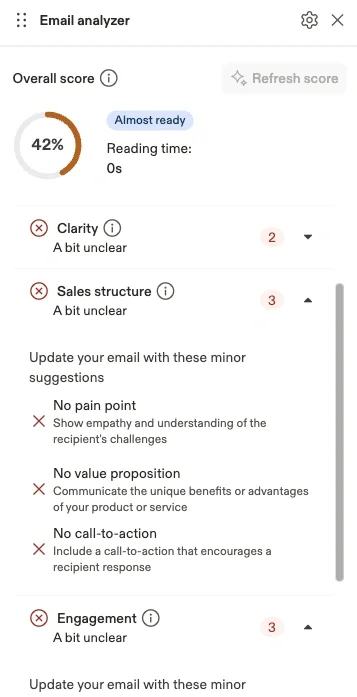
At Apollo, SDRs send millions of cold emails every month. The difference between a 2% and 5% positive reply rate is the difference between hitting quota and missing it. Yet most SDRs don't know if their email is any good until after they've sent it and watched the replies—or lack thereof—trickle in. We built a tool that gives users instant feedback on their cold emails before they hit send. But building it taught us something counterintuitive about ML in production: sometimes the best thing you can do with a trained model is throw it away.
🎯 The Goal: Actionable Feedback, Not Just a Score
When we started, the obvious approach was to build a classifier. We curated a dataset of ~2,000 emails with engagement stats to train on.
After that, it was textbook ML: train a model on email data with open/reply rates, predict the probability of success, scale it to 0-100, done! Straightforward, right? Well, not really. We quickly realized this created a frustrating user experience.
Imagine you’re an SDR. You draft your email in the composer, hit the analyze button and get back: “Score: 62/100”.
Now what?
You have no idea why it’s 62. You tweak the subject line, re-run the analyzer, and get… 62. You shorten the body, try again… still 62. The score feels arbitrary, like a slot machine that won’t pay out.
We didn’t just want to tell users if their email was good or bad. We wanted to tell them how to improve it.
🔬 The Experiments: Finding What Actually Matters
We started with a systematic exploration of what features correlate with email success. We ran experiments across multiple model architectures:
| Model | Key Finding | Correlation |
|---|---|---|
| OLS Regression | Features had tiny coefficients, reply rates too small to learn from | 0.44 |
| Lasso | Only selected 2 features: body_word_count, opener_you_i_ratio |
0.34 |
| ElasticNet | Added opener_word_count to the mix |
0.28 |
| Random Forest | Revealed 9 important features with optimal ranges | 0.43 |
Random Forest was the winner — not because it had the highest correlation, but because of what it revealed through Partial Dependence Plots (PDP).
💡 The Breakthrough: Interpretability Over Prediction
Here’s where it gets interesting. PDP is a technique from ML interpretability that shows you how each feature contributes to the model’s prediction. When we applied it to our Random Forest, we got optimal ranges for each feature.
For example, we discovered:
- Subject line length: 1-5 words performs best (not “shorter is better” — there’s a floor)
- Body word count: 20-100 words is the sweet spot
- Reading grade: 5th grade or lower maximizes engagement
Linear models gave us thresholds (“subject < 6 words”). Random Forest gave us ranges (“1-5 words”), which is far more actionable.
Then we made a decision that felt wrong at first: we threw away the model entirely.
Instead of deploying the Random Forest and using its probability scores, we extracted the rules and built a purely rule-based scoring system, where each feature is evaluated independently. Pass the optimal range? No issue. Violate it? One issue. The final score is simply the percentage of criteria you’re meeting.
🤔 Why Rule-Based Beats ML Prediction
This might sound like a step backwards, but it solved a critical UX problem.
With an ML probability score, fixing one thing didn’t guarantee improvement. You might fix your subject line, but if the model has learned complex feature interactions, your score could stay flat or even drop. Users feel like they’re playing whack-a-mole with an invisible opponent.
With our rule-based system:
- Fix the subject line → score improves by exactly X points
- Fix the reading level → score improves by exactly Y points
- Every fix has a predictable, visible impact
One of our users captured this perfectly:
“More important than the overall score, is that the tool provides feedback on each criteria point needed to make appropriate changes.”
That’s exactly what we were going for.
🚧 The Problem: Good Scores for Bad Emails
Our rule-based system worked great until it didn’t.
We discovered that emails could score well on all our syntactic features (word count, reading level, sentence length) but still be terrible sales emails. They were readable, sure, but they had no pain point, no value proposition, no call-to-action, merely well-constructed sentences that wouldn’t win customers.
Syntactic features measure how an email is written. But they can’t measure what it says.
This led us to add a second layer: semantic analysis powered by LLMs. We now evaluate emails on:
- Pain Point: Does it acknowledge the recipient’s challenges?
- Value Proposition: Does it explain what you’re offering?
- Personalization: Is it about them, not just you?
- Call-to-Action: Is there a clear next step?
- Social Proof: Any credibility signals?
- Tone Detection: Does it sound confident or desperate?
Each category uses carefully crafted prompts that ask yes/no questions about the email content. We aggregate the responses into the same rule-based scoring framework — keeping the predictable, actionable UX intact.
⚡ The Latency Challenge: From 25 Seconds to 2
Adding LLMs to the mix created a new problem: latency. Our initial implementation took 25 seconds to analyze an email. That’s an eternity when you’re trying to help users iterate quickly.
We attacked this from two angles:
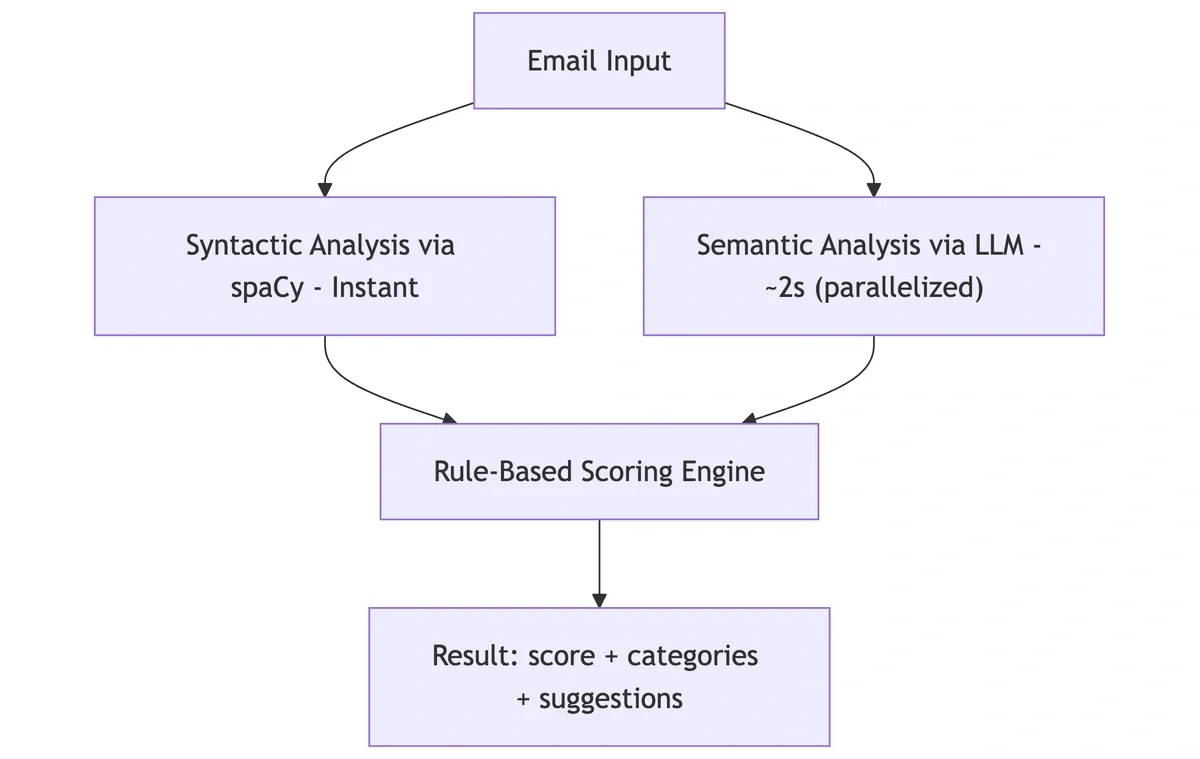
1. Parallelization: Instead of calling the LLM sequentially for each category, we fire all the prompts concurrently.
2. Faster Models: Because each category is analyzed independently and within a narrow scope, we found that smaller, faster models performed extremely well. The accuracy tradeoff was negligible, while the latency gains were substantial.
Result: ~2 second analysis time, fast enough that users actually use it iteratively while writing.
📐 The Architecture Today
The final system combines both approaches:
🎓 What We Learned
Building the Email Analyzer taught us some lessons that apply beyond this specific feature:
1. Explainability often beats accuracy. A 95% accurate black box that users don’t trust is less useful than an 85% accurate system they can understand and act on.
2. Use ML to discover rules, not just make predictions. PDP and other interpretability techniques let us extract human-understandable insights from our model. Insights that in this case became the actual product.
3. Predictable > Precise. Users don’t need a perfect score. They need a score that moves in the direction they expect when they make changes.
4. Latency is a feature. Our semantic analysis is only valuable because we got it under 2 seconds. At 25 seconds, users wouldn’t iterate, they’d just send their first draft and abandon the analyzer.
🔮 Looking Ahead — Join Us at Apollo!
The Email Analyzer started as a classic ML problem: predict email success. It became something more interesting: an interpretable, actionable feedback system built on top of ML insights. We trained a model not to deploy it, but to learn from it.
This is the kind of creative problem-solving we do every day at Apollo — using AI not just as a hammer, but as a tool that genuinely improves how our users work.
We’d love for smart engineers like you to join our fully remote, globally distributed team. Click here to apply now!